
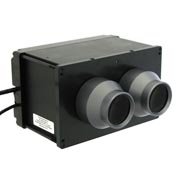
Digital viewer for presenting stereoscopic images as well as 3D video.
The viewing method is based on the side by side principe on one single or doubleLCD. A image splitter inside the viewer prevents crosstalk for the left and right eye. Most stereoscopic content is available in this format on the internet as well consumer (video) cameras. You can decide yourself the kind of source to connect to the viewer; laptop, desktop or media player. The viewer acts like a mini monitor with HDMI connector.
The graphics data to the viewer is simple and does not require a lot of processing power. This allows the source to be simple / small. One solution we provide is a pre configured Raspberry pi micro computer. A simple slide show with side by side images is enought.
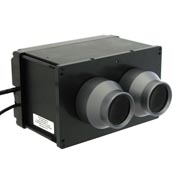
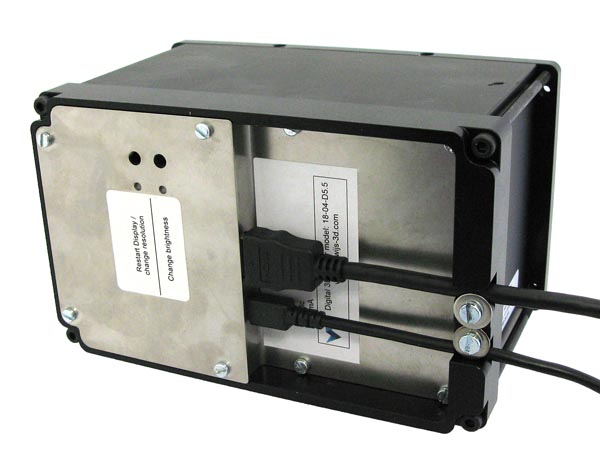
Viewer with 120 mm. optics Rear side of the viewer with connectors.
The viewer is available in 2 models:
18-04-D55-100 Viewer is fit with 100 mm. optics.
18-04-D55-120 Viewer is fit with 120 mm. optics.
General specifications:
- The Image is presented on 1 single display panel of 5.5" or 2 small 2.9" positioned side by side.
- The 3D images should be presented side by side to be viewed parallel.
- HDMI 1.4 input.
- The viewer holds hight quality achromatic lenses of 100 or 120 mm. focal distance. For video 100 mm. optics are a good choice. For square content, the 120 mm. lenses are the best choice to allow almost every visitor to see the whole image.
- Lens sepperation, 63 mm.
- The lens opening allows glasses wearers to see the whole image from corner to corner sharp and straight.
- The viewer is made of black anodized aluminium. The lens barrels are made of grey hard anodized aluminium.
- A black build - in front plate for the viewer only is supplied with the viewer.
CAUTION: WHEN YOU CHOOSE A LOCATION FOR THE VIEWER IN YOUR PRESENTATION AREA, BE SURE THAT THERE IS NEVER A MOMENT THE SUN IS ENTERING THE LENSES. THE LCD WILL BE DAMAGED BY SUN BURN IN.
The viewer is able to acomodate different types of display resolution sets at the rear of the viewer. At this moment we offer 3 types.
| Display sets horizontal x vertical |
QHD 1440x2560 |
QHD* 2560x1440 |
landscape 2880x1440 |
UHD 2160x3840 |
| Model indication | 18-04-D55B | 18-04-D55BR | 18-04-D55C | 18-04-D55D |
| Number of LCDs | 1 | 1 | 2 | 1 |
| LCD size | 5.5" | 5.5" | 2.9" | 5.5" |
| Resolution each eye | 1280x1440 | 1280x1440 | 1440x1440 | 1920x2160 |
| Raspbery pi control? | Yes | Yes | Yes | Yes |
| Raspbery OS landscape? | RP4 | landscape! RP2,3,4 |
RP2,3,4 |
RP2,3 1080p only |
| Resolution selection on controler? |
1440x2560 | 1440x2560 2560x1440 |
1440x1440 2880x1440 |
1080x1920 |
| Refresh frequency | 60Hz. | 50Hz. | 60Hz. 2D 70Hz. 3D |
60Hz. HD |
* This QHD set can switch between landscape or portrait orientation at the input of the HDMI.
In portrait mode, the supplied resolution of 1440x2560 (hxv) is transfered 1 to 1 to the LCD.
In landscape mode, the supplied resolution of 2560x1440 (hxv) is transfered in the correct orientation and aspect ratio to the LCD at a resolution of 2032x1440 pixels.
Click here for the manual for the 18-04-D55-x 3D digital viewer
18-04-d5-5-integration-model STEP file
You can supply your own media / signage player to control the viewer. However, de Wijs can also provide a simple media player with pre-configured situations for a specifi task.
version 1. Standard, Raspberry pi with Pi presents installed. Manual show configuration, automatic show start after boot.
version 2. Raspberry pi with Pipresents, plug & play loading show fast and play immediately (trigger button), including the options of version 1.
version 3. Raspberry pi with Pipresents, Cinema trailer viewer, load show fast (with trigger button), menu controlled with buttons, automatic show start after boot
Click here for the manual to have the viewer controlled by the Raspberry pi. (version 1)
Click here for the cinema configuration of the Raspberry pi (version 3)
LIMITED WARRANTY:
The LCD(s) in the viewers are made for smartphones and VR viewers, consumer electronics. However, the active usage time in the viewer is considerably longer than with mentioned applications. The environmental conditions might differ as well. The life span of the LCD might be limmited.
In the unlikely event that the LCD breaks, outside of improper use, within a year, a new LCD set will be made available free of charge, with the request to return the old one.
When the LCD fails after 1 year of purchase, whether it is the first or already a renewed LCD set, we charge LCD replacement costs when returning the old set. These replacement costs are lower than a complete set. The height depends on the type of LCD (s).
Known Issues:
When the viewer is connected to Apple products with Apple Silicon hardware, MacOS forces YCbCr colors instead of RGB, resulting in a strong pink tint across the entire image. Tools such as BetterDisplay can remedy this.
When the viewer is connected to Brightsign, it may decide to output YCbCr colours instead of the required RGB, resulting in strong pink and green tints across the entire screen. A possible solution to this is to manually set the resolution, as well as the colour space, instead of automatic detection.